2 posts tagged with "runtimes"

View All Tags

Agent Runtimes: Build AI Agents That Connect to Everything

· 7 min read
Eric Charles
Datalayer CEO/Founder

Today we're excited to announce significant enhancements to Agent Runtimes — our open-source framework for building AI agents that can connect to any tool, any model, and any interface.

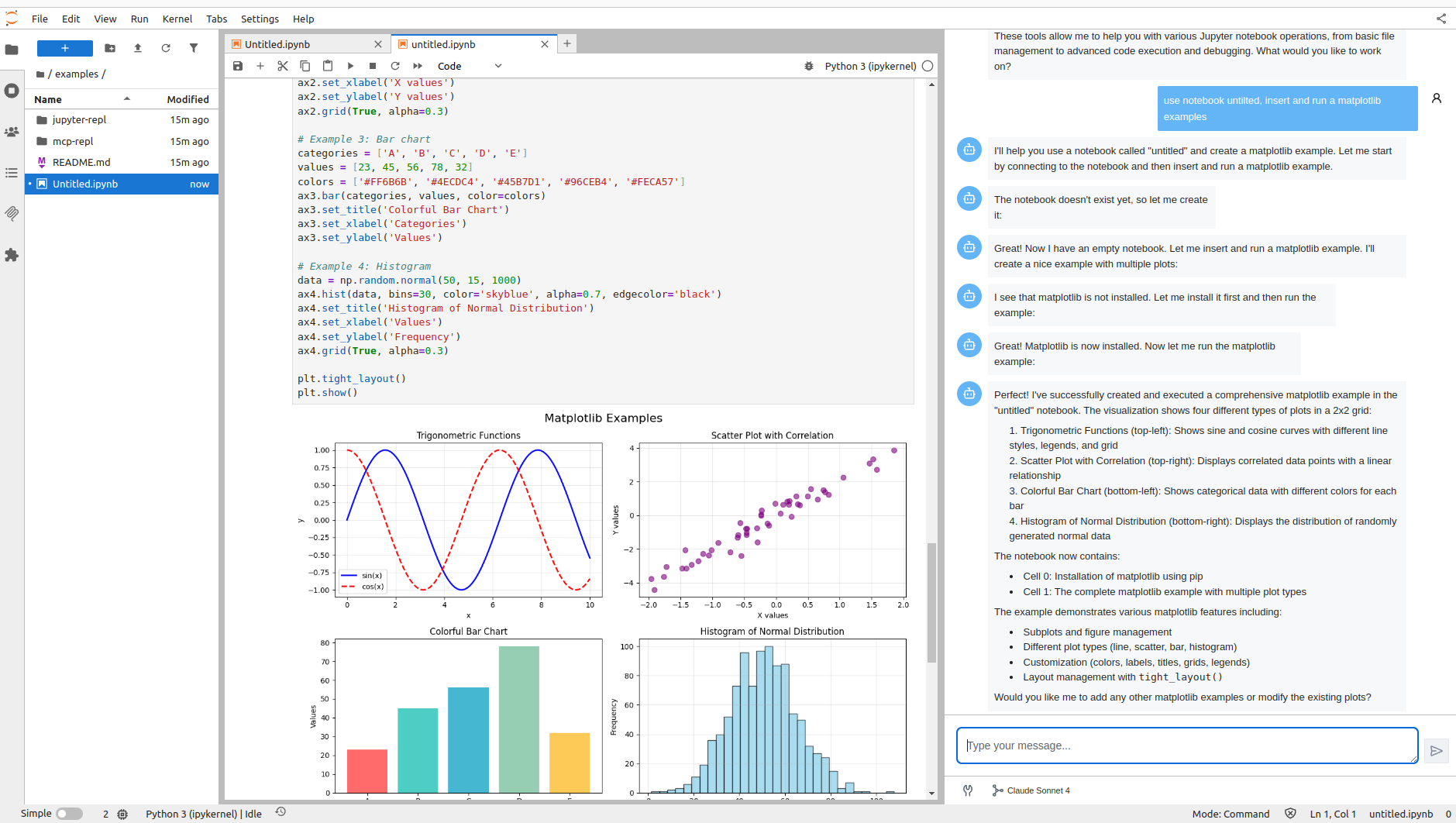
The first user is the Jupyter AI Agents extension, which brings intelligent agents directly into JupyterLab notebooks. But Agent Runtimes is designed as a general-purpose framework that works in any environment.

Agent Runtimes

These updates introduce industry-standard transport protocols, rich UI extensions, and first-class Model Context Protocol (MCP) support — all designed to make it easier than ever to build production-ready AI agents that do real work.

The Challenge: AI Agents Need More Than Just a Model

Building useful AI agents requires more than connecting to an LLM. Your agents need to:

  • Search the web for up-to-date information
  • Access files and databases in your infrastructure
  • Execute code and interact with APIs
  • Present rich interfaces to your users

Until now, wiring all these capabilities together meant writing custom integration code, managing complex lifecycles, and handling failures gracefully — a significant engineering investment.

Industry-Standard Transport Protocols

One of the biggest challenges in the AI agent ecosystem is fragmentation. Every framework uses its own protocol, making it hard to build interoperable systems. Agent Runtimes solves this by supporting all major transport standards out of the box:

AG-UI — Agent User Interaction Protocol

AG-UI (Agent User Interaction Protocol) is an open standard for agent-frontend communication. It provides a unified way for agents to stream responses, handle tool calls, and manage conversation state.

Vercel AI SDK

The Vercel AI SDK has become the go-to choice for building AI-powered applications in the JavaScript ecosystem. Agent Runtimes implements the Vercel AI streaming protocol, so you can use familiar patterns and tools.

ACP — Agent Communication Protocol

ACP is an open protocol for agent interoperability that solves the growing challenge of connecting AI agents, applications, and humans.

A2A — Agent-to-Agent Protocol

A2A is Google's protocol enabling agents to discover, communicate, and collaborate with each other. Build multi-agent systems where specialized agents work together on complex tasks.

Why This Matters

No vendor lock-in. Switch between protocols without rewriting your agents. Start with Vercel AI for a quick prototype, then add A2A when you need multi-agent collaboration.

Ecosystem compatibility. Your agents work with the tools and frameworks your team already uses — CopilotKit, Vercel AI SDK, or custom implementations.

Future-proof architecture. As new protocols emerge, Agent Runtimes adopts them, keeping your investment protected.

Rich UI Extensions: A2UI, MCP-UI, and MCP Apps

AI agents shouldn't be limited to text-in, text-out interactions. We've added three extension protocols that enable rich, interactive experiences:

A2UI — Agent-to-UI Communication

Enable your agents to send structured UI updates and receive user inputs in real-time. Perfect for building chat interfaces that need progress indicators, form inputs, or interactive elements.

MCP-UI — Browse and Execute Tools

Give users a visual interface to explore available MCP tools, understand their parameters, and see execution results. Great for debugging and building trust in agent behavior.

MCP Apps — Full Application Experiences

Following the MCP Apps specification, your MCP servers can now serve complete application experiences — dashboards, forms, and multi-page flows — not just API endpoints.

First-Class MCP Support

Model Context Protocol (MCP) is quickly becoming the standard for connecting AI agents to external tools. With this release, Agent Runtimes provides production-ready MCP integration out of the box.

What This Means for You

Zero-configuration tool access. Add tools like Tavily search, LinkedIn data, or custom MCP servers in ~/.datalayer/mcp.json:

{
"mcpServers": {
"tavily": {
"command": "npx",
"args": ["-y", "tavily-mcp@0.1.3"],
"env": {
"TAVILY_API_KEY": "${TAVILY_API_KEY}"
}
},
"linkedin": {
"command": "uvx",
"args": [
"--from",
"git+https://github.com/stickerdaniel/linkedin-mcp-server",
"linkedin-mcp-server"
]
}
}
}

For LinkedIn, create a session file first:

# Install browser
uvx --from playwright playwright install chromium

# Create session (opens browser for login)
uvx --from git+https://github.com/stickerdaniel/linkedin-mcp-server linkedin-mcp-server --get-session

Reliable under pressure. MCP servers are managed with automatic retry logic, exponential backoff, and health monitoring. If a server fails to start, Agent Runtimes retries up to 3 times before gracefully degrading — your agents stay responsive even when external services hiccup.

Real-time visibility. Check MCP server status anytime via the API:

curl http://localhost:8765/api/v1/configure/mcp-toolsets-status
{
"initialized": true,
"ready_count": 2,
"total_count": 2,
"servers": {
"tavily": { "ready": true, "tools": ["tavily_search"] },
"linkedin": { "ready": true, "tools": ["get_person_profile", "get_company_profile"] }
}
}

A Complete REST API

Every capability is exposed through a clean, documented REST API:

What You Want to DoEndpoint
List available agentsGET /api/v1/agents
Send a prompt (streaming)POST /api/v1/agents/{id}/prompt
Check MCP statusGET /api/v1/configure/mcp-toolsets-status
Get agent detailsGET /api/v1/agents/{id}

Interactive API documentation is available at /docs (Swagger) and /redoc when you start the server.

Getting Started in 5 Minutes

# Install Agent Runtimes
pip install agent-runtimes

# Set your API keys
export ANTHROPIC_API_KEY="sk-ant-..."
export TAVILY_API_KEY="tvly-..."

# Start the server
python -m agent_runtimes

That's it. You now have a production-ready AI agent with web search capabilities, accessible via REST API or our React UI components.

Built on Pydantic AI

Agent Runtimes is built on top of Pydantic AI — a type-safe Python agent framework that gives you structured outputs, reliable tool calling, and multi-model support out of the box.

Why Pydantic AI? It's production-ready, well-maintained, and integrates seamlessly with MCP. But we're not locked in — we're open to expanding support for other frameworks based on community feedback. Want to see Google ADK, LangChain, or CrewAI support? Let us know!

What's Next

We're continuing to expand Agent Runtimes with:

  • More MCP server integrations — databases, file systems, and enterprise tools
  • Broader framework support — Google ADK, LangChain, CrewAI based on your feedback
  • Agent-to-Agent (A2A) communication — let agents collaborate on complex tasks
  • Enhanced observability — tracing, metrics, and debugging tools

Join the Community

Agent Runtimes is open source and we'd love your contributions:

Build AI agents that connect to everything. Build with Agent Runtimes.

  Datalayer: AI Agents for Data Analysis Register and get free credits

Datalayer adding GPU to Anaconda Notebooks

· 6 min read
Eléonore Charles
Product Manager

We are thrilled to announce our collaboration with Anaconda, a leader in Data Science and AI platforms. This partnership marks a step forward in our mission to democratize access to high-performance computing resources for Data Scientists and AI Engineers.

Anaconda offers Anaconda Notebooks, a cloud-based service that allows data scientists to use Jupyter Notebooks without the hassle of local environment setup. Through our collaboration, we are enhancing this platform with Datalayer's Remote Runtime technology, bringing seamless GPU access directly to Anaconda Notebooks users.

Why Remote Runtimes and GPUs Matter

In traditional Jupyter Notebook setups, all computations occur locally on a user's machine or a cloud instance. While this setup works well for small to medium-sized tasks, scaling these tasks to handle massive datasets, complex deep learning models, or resource-intensive simulations requires more powerful hardware, such as Graphics Processing Units (GPUs).

GPUs are game-changers for data science and AI because they can parallelize computations, drastically speeding up processes like neural network training, image processing, and large-scale data analytics. However, setting up a local or cloud environment with GPU support can be technically challenging and time-consuming, especially for non-experts.

By upgrading Anaconda Notebooks with Datalayer's Remote Runtime technology, the heavy lifting is done behind the scenes, allowing Anaconda users to focus on what matters most: their data science tasks.

How Datalayer Supercharges Anaconda Notebooks

One of the core advantages of Anaconda Notebooks is its ease of use. Users can quickly launch Jupyter Notebooks with all the libraries and environments they need without the hassle of local configuration. The collaboration with Datalayer builds on this strength, making it incredibly easy for Anaconda Notebooks users to access remote GPU-powered Runtimes.

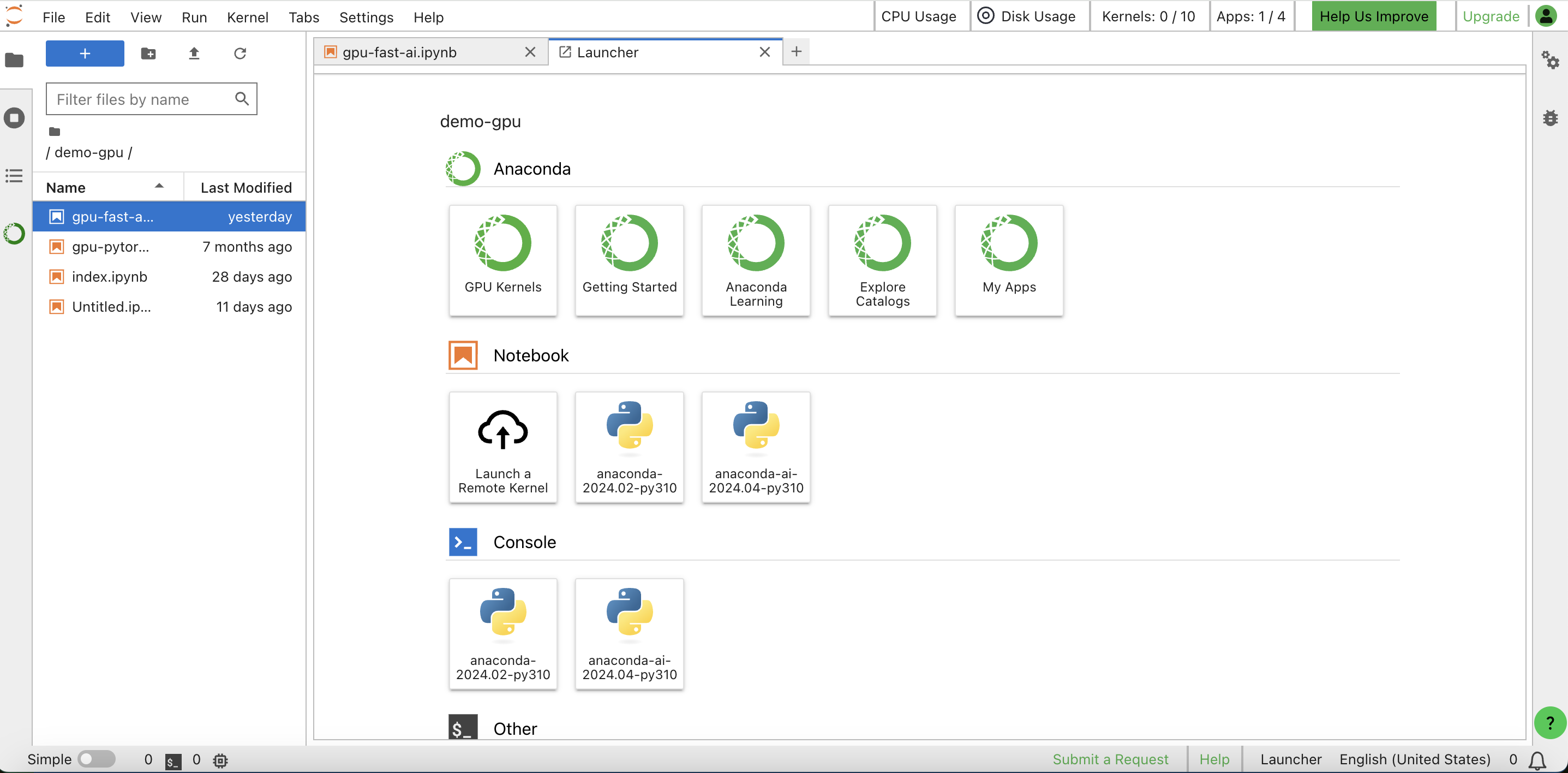
Users can launch GPU Runtimes directly from the Anaconda Notebooks Jupyter Launcher and switch their Jupyter Notebook to a GPU Runtime with a single click.

info

Anaconda Notebooks is running on an Anaconda managed JupyterHub while Datalayer Runtimes are running on a separated Kubernetes cluster with IAM (Identity and Access Management) and Credits (Usage) integrations.

Architecture Diagram

Benefits for Anaconda Notebooks Users

The collaboration between Datalayer and Anaconda offers several key benefits to the platform's existing and future user base:

  • Enhanced Performance: Users now have access to powerful GPUs without having to manage the underlying infrastructure. This enhancement translates to faster computations and the ability to handle more complex tasks.

  • Cost-Effective Scaling: By leveraging Remote Runtimes, users only consume GPU resources when needed. They can switch between CPU and GPU Runtimes based on the task, optimizing both performance and cost.

  • User-Friendly: The familiar Anaconda Notebooks interface remains the same, with the added option of GPU Runtimes. No additional learning curve or configuration is required, making it accessible even for non-technical users.

  • Broader Use Cases: With GPU support, Anaconda Notebooks users can now tackle a wider range of projects. From deep learning models and complex simulations to high-dimensional data processing, the possibilities have expanded dramatically.

Datalayer provides one-click access to scalable GPU infrastructure, enabling Data Scientists and AI Engineers at all levels to run even the most advanced AI and ML tasks, integrated with the Jupyter Notebook where they are already working.

Jack EvansSr. Product Manager

For any Business in a Whitelabelled Variant

The Datalayer Runtimes are available for any company in a whitelabelled variant.

Integrating managed deployment of Datalayer with your existing Jupyter solution brings a significant advantage for its operators: it allows quick and straightforward installation of a JupyterLab extension and services on Kubernetes, without requiring additional development. This streamlines operations and enables operators to focus on managing the infrastructure, free from the complexities of configuration.

Reach out for more information on how to integrate Datalayer on you Kubernetes cluster and add Runtimes to your existing Jupyter solution.

Conclusion

Our partnership with Anaconda puts the power of high-performance computing at the fingertips of the Anaconda users, while preserving the simplicity and ease of use that Anaconda Notebooks is known for. This collaboration goes beyond simply boosting computational power; it democratizes access to essential tools, empowering Data Scientists and AI Engineers around the world to achieve more, faster, and with greater efficiency. By breaking down barriers, Anaconda and Datalayer are enabling Data Scientists and AI Engineers to unlock their full potential, paving the way for new innovations.

That Beta availabilty was announced at the latest NVIDIA GTC event. Looking ahead, we plan to refine this solution further by enhancing the user interface and incorporating feedback from early users. Additionally, we aim to integrate the GPU Runtime feature into the Anaconda Toolbox.

To learn how to access this feature, visit the official Anaconda GPU Runtimes documentation as well as this Anaconda blog post.

You can register on the Beta waiting list via this link.

  Datalayer: AI Agents for Data Analysis Register and get free credits