Jupyter Embed: Transform Any Website into an Interactive Computing Platform
We're excited to announce Jupyter Embed (@datalayer/jupyter-embed), the simplest way to bring the full power of Jupyter to any website, blog, or documentation page.
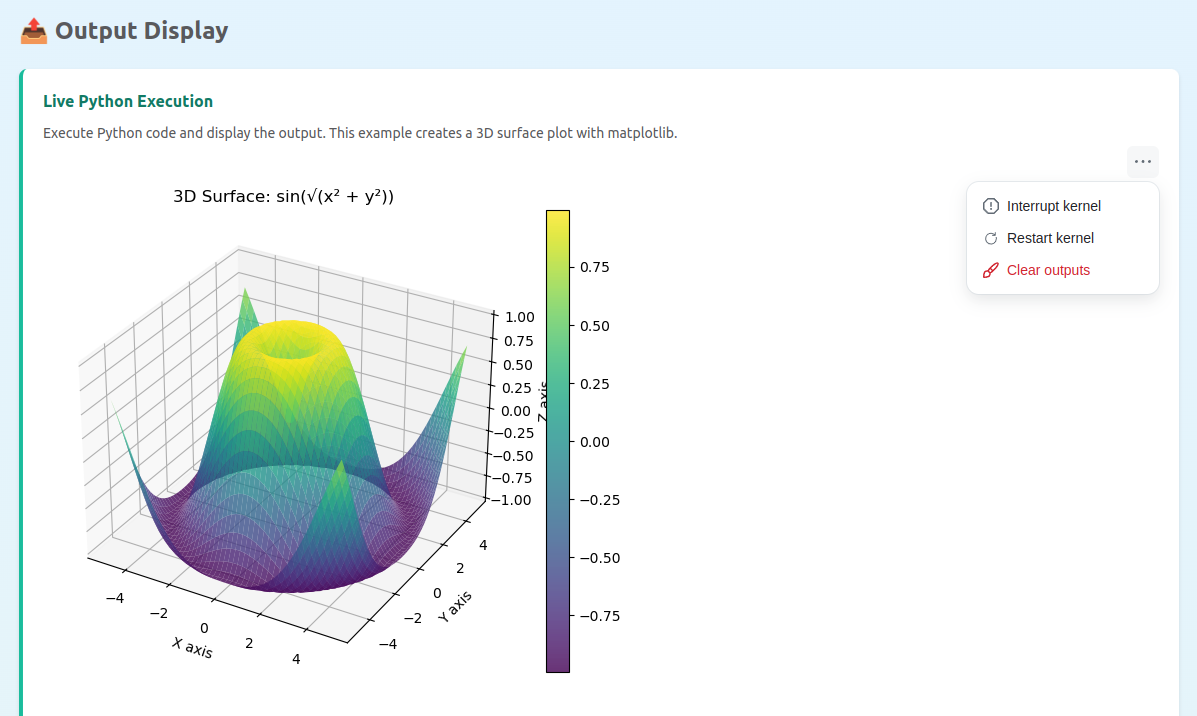
Try It Live
Want to see Jupyter Embed in action before copying any code? Visit our live demo at jupyter-embed.datalayer.tech.
The demo showcases all component types - code cells, notebooks, terminals, consoles, and viewers - running live in your browser. It works seamlessly across:
- ✅ Desktop browsers: Chrome, Firefox, Safari, Edge
- ✅ Mobile browsers: iOS Safari, Android Chrome
- ✅ Tablets: iPad, Android tablets
No installation required. Just open the link and start exploring interactive Jupyter components.

The Challenge: Interactive Computing on the Web
Technical content creators face a common dilemma: how do you make code examples truly interactive? Static code blocks don't engage readers, and setting up a full Jupyter environment requires significant infrastructure and technical knowledge.
We asked ourselves: What if adding a live Python cell to your blog was as simple as adding an image?
Introducing Jupyter Embed
Jupyter Embed lets you transform any web page into an interactive computing platform. Here's a complete, minimal HTML file you can copy and open in your browser:
<!DOCTYPE html>
<html lang="en">
<head>
<meta charset="UTF-8" />
<meta name="viewport" content="width=device-width, initial-scale=1.0" />
<title>Jupyter Embed - Minimal Example</title>
<!-- Required for ipywidgets support -->
<script
data-jupyter-widgets-cdn="https://cdn.jsdelivr.net/npm/"
data-jupyter-widgets-cdn-only="true"
></script>
<script src="https://cdnjs.cloudflare.com/ajax/libs/require.js/2.3.6/require.min.js"></script>
</head>
<body>
<h1>My Interactive Code</h1>
<!-- Jupyter Cell -->
<div
data-jupyter-embed="cell"
data-jupyter-height="200px"
data-jupyter-auto-execute="true"
>
<code data-jupyter-source-code>
print("Hello from Jupyter!")
</code>
</div>
<!-- Load Jupyter Embed with configuration -->
<script
type="module"
src="https://jupyter-embed.datalayer.tech/jupyter-embed.lazy.js"
data-jupyter-server-url="https://oss.datalayer.run/api/jupyter-server"
data-jupyter-token="60c1661cc408f978c309d04157af55c9588ff9557c9380e4fb50785750703da6"
data-jupyter-lazy-load="true"
data-jupyter-auto-start-kernel="true"
></script>
</body>
</html>
That's it. No React. No build tools. No complex configuration. Just HTML.
Note: The example above uses Datalayer's public demo server. For production use, configure your own Jupyter server.
Use Cases: Sharing, Education & Beyond
Jupyter Embed opens up new possibilities for how we share and teach code:
🎓 Education & Online Learning
Transform passive learning into active exploration. Students can run, modify, and experiment with code examples directly in course materials - no setup required. Instructors can create interactive tutorials where learners see immediate results from their code changes.
Perfect for:
- University courses and MOOCs
- Coding bootcamps
- Corporate training programs
- Self-paced learning platforms
📚 Technical Documentation
API documentation comes alive when users can execute examples on the spot. Instead of copying code to a separate environment, developers can test functions, see outputs, and understand behavior instantly.
Perfect for:
- Library and framework docs
- API reference guides
- SDK tutorials
- Developer portals
📝 Technical Blogging
Engage readers with executable code blocks that transform static articles into interactive experiences. Readers can modify parameters, see different outputs, and truly understand the concepts you're explaining.
Perfect for:
- Data science tutorials
- Algorithm explanations
- Machine learning walkthroughs
- Scientific computing articles
🔬 Research & Reproducibility
Share reproducible analyses alongside your publications. Reviewers and readers can verify results, explore alternative parameters, and build upon your work - all without downloading datasets or configuring environments.
Perfect for:
- Academic papers
- Research blogs
- Data journalism
- Open science initiatives
🤝 Code Sharing & Collaboration
Share working code snippets that recipients can run immediately. No more "it works on my machine" - your code runs in their browser with the same environment.
Perfect for:
- Stack Overflow-style Q&A
- Code reviews
- Team knowledge bases
- Technical presentations
Six Powerful Components
Jupyter Embed provides six component types to cover every interactive computing use case:
🧪 Code Cells
Interactive cells with full execution capability, syntax highlighting, and rich output support:
<div data-jupyter-embed="cell" data-jupyter-height="200px">
<code data-jupyter-source-code>
print("Hello from Jupyter!")
</code>
</div>
📓 Full Notebooks
Embed complete Jupyter notebooks from a file path, URL, or inline JSON:
<div data-jupyter-embed="notebook"
data-jupyter-path="tutorials/getting-started.ipynb"
data-jupyter-height="500px">
</div>
💻 Terminals
Full interactive terminal sessions for shell commands and system interaction:
<div data-jupyter-embed="terminal"
data-jupyter-height="300px"
data-jupyter-color-mode="dark">
</div>
🖥️ Consoles
Jupyter REPL-style console for interactive Python sessions:
<div data-jupyter-embed="console" data-jupyter-height="400px">
<code data-jupyter-pre-execute-code>
import pandas as pd
print("Pandas ready for data analysis!")
</code>
</div>
📊 Output Display
Show pre-computed Jupyter outputs without execution:
<div data-jupyter-embed="output" data-jupyter-height="200px">
</div>
👁️ Notebook Viewer
Read-only notebook rendering - perfect for documentation:
<div data-jupyter-embed="viewer"
data-jupyter-url="https://example.com/analysis.ipynb">
</div>
Built for Performance
Jupyter Embed is designed with performance in mind:
- Lazy Loading: Components are loaded on-demand, keeping initial page load fast
- Code Splitting: Each component type loads only the dependencies it needs
- Smart Bundling: Choose between full bundle or modular chunks based on your needs
- Optimized Assets: Minified production builds under 500KB gzipped
Flexible Configuration
Configure your Jupyter connection globally or per-component:
<script>
JupyterEmbed.configureJupyterEmbed({
serverUrl: 'https://your-jupyter-server.com',
token: 'your-token',
defaultKernel: 'python3',
lazyLoad: true
});
</script>
Or use data attributes for per-component configuration:
<div data-jupyter-embed="cell"
data-jupyter-server-url="https://alternate-server.com"
data-jupyter-kernel="julia">
</div>
JavaScript API for Advanced Control
For dynamic applications, use the JavaScript API:
// Initialize all embeds on the page
JupyterEmbed.initJupyterEmbeds();
// Initialize embeds added dynamically (e.g., after AJAX)
JupyterEmbed.initAddedJupyterEmbeds(containerElement);
// Render programmatically
const element = document.getElementById('my-embed');
JupyterEmbed.renderEmbed(element, {
type: 'cell',
source: 'print("Created dynamically!")',
autoExecute: true
});
// Clean up when done
JupyterEmbed.destroyJupyterEmbeds();
Powered by Jupyter React
Jupyter Embed is built on top of @datalayer/jupyter-react, our battle-tested library of React components that provide a 100% Jupyter-compatible UI layer.
Flexible Kernel Options
Jupyter Embed works with multiple execution backends:
- Remote Jupyter Server: Connect to any Jupyter server (JupyterHub, JupyterLab, Jupyter Server) for full Python environment access with all your packages
- Browser-based Pyodide: Run Python directly in the browser using Pyodide - no server required, perfect for static sites and offline use
Full Jupyter Ecosystem Compatibility
- Kernel Protocol: Complete implementation of the Jupyter messaging protocol
- Rich Outputs: HTML, images, LaTeX, interactive widgets (ipywidgets), and custom MIME types
- Real-time Collaboration: Built-in support for collaborative editing
- JupyterLab Extensions: Compatible with the JupyterLab extension ecosystem
Open Source
The entire project is open source under the MIT license:
- Jupyter Embed: github.com/datalayer/jupyter-ui/tree/main/packages/embed
- Jupyter React: github.com/datalayer/jupyter-ui/tree/main/packages/react
- Jupyter UI (monorepo): github.com/datalayer/jupyter-ui
Get Started Today
Ready to make your web content interactive?
🚀 Live Demo: jupyter-embed.datalayer.tech
📦 NPM Package: @datalayer/jupyter-embed
📖 Documentation: Jupyter Embed Docs
💻 Source Code: GitHub Repository
Jupyter Embed is part of the Jupyter UI project by Datalayer, building the future of interactive computing on the web.
