
GPU Acceleration for Jupyter Cells

· 7 min read
Eléonore Charles
Product Manager

In the realm of AI, data science, and machine learning, Jupyter Notebooks are highly valued for their interactive capabilities, enabling users to develop with immediate feedback and iterative experimentation.

However, as models grow in complexity and datasets expand, the need for powerful computational resources becomes critical. Traditional setups often require significant adjustments or sacrifices, such as migrating code to different platforms or dealing with cumbersome configurations to access GPUs. Additionally, often only a small portion of the code requires GPU acceleration, while the rest can run efficiently on local resources.

What if you could selectively run resource-intensive cells on powerful remote GPUs while keeping the rest of your workflow local? That's exactly what Datalayer Cell Kernels feature enables. Datalayer works as an extension of the Jupyter ecosystem. With this innovative approach, you can optimize your cost without disrupting your established processes.

We're excited to show you how it works.

The Power of Selective Remote Execution

Datalayer Cell Kernels introduce a game-changing capability: the ability to run specific cells on remote GPUs while keeping the rest of your notebook local. This selective approach offers several advantages:

  1. Cost Optimization: Only use expensive GPU resources when absolutely necessary.
  2. Performance Boost: Accelerate computationally intensive tasks without slowing down your entire workflow.
  3. Flexibility: Seamlessly switch between local and remote execution as needed.

Let's dive into a practical example to see how this works. We'll demonstrate this hybrid approach using a sentiment analysis task with Google's Gemma-2 model.

Create the LLM Prompt

We start by creating our prompt locally. This part of the notebook runs on your local machine:

prompt = """
Analyze the following customer reviews and provide a structured JSON response for each review. Each response should contain:

- "review_id": A unique identifier for each review.
- "themes": A dictionary where each key is a theme or topic mentioned in the review, and each value is the sentiment associated with that theme (positive, negative, or neutral).

Format your response as a JSON array where each element is a JSON object corresponding to one review. Ensure that the JSON structure is clear and easily parseable.

Customer Reviews:

1. "I love the smartphone's performance and speed, but the battery drains quickly."
2. "The smartphone's camera quality is top-notch, but the battery life could be better."
3. "The display on this smartphone is vibrant and clear, but the battery doesn't last as long as I'd like."
4. "The customer support was helpful when my smartphone had issues with the battery draining quickly. The camera is ok, not good nor bad."

Respond in this format:
[
{
"review_id": "1",
"themes": {
"...": "...",
...
}
},
...
]
"""

Analyse Topics and Sentiment on Remote GPU

Now, here's where we leverage the remote GPU. This cell contains the code to perform sentiment analysis using the Gemma-2 model and the Hugging Face Transformers library. We'll switch to the Remote Kernel for just this cell:

from huggingface_hub import login
from transformers import AutoTokenizer, AutoModelForCausalLM
import torch

# Login to Hugging Face
login(token="HF_TOKEN")

# Load the tokenizer
tokenizer = AutoTokenizer.from_pretrained("google/gemma-2-2b-it")

# Load the model
model = AutoModelForCausalLM.from_pretrained(
"google/gemma-2-2b-it",
device_map="auto",
torch_dtype=torch.bfloat16,
)

# Prepare the prompt
chat = [{"role": "user", "content": prompt},]

# Generate the prompt and perform inference
prompt = tokenizer.apply_chat_template(chat, tokenize=False, add_generation_prompt=True)
inputs = tokenizer.encode(prompt, add_special_tokens=False, return_tensors="pt")
outputs = model.generate(input_ids=inputs.to(model.device), max_new_tokens=2000)

# Decode the response, excluding the input prompt from the output
prompt_length = inputs.shape[1]
response = tokenizer.decode(outputs[0][prompt_length:])

By executing only this cell remotely, we're optimizing our use of GPU resources. This targeted approach allows us to tap into powerful computing capabilities precisely when we need them, without the overhead of running our entire notebook on a remote machine.

To execute this cell on a remote GPU, you just have to select the remote environment for this cell.

This is done with just a few clicks, as shown below:

With a simple selection from the cell dropdown, you can seamlessly transition from local to remote execution.

info

Using a Tesla V100S-PCIE-32GB GPU, the sentiment analysis task completes on average in 10 seconds. The number of tokens/seconds processed is ± 19.

The model was pre-downloaded in the remote environment. This was done to eliminate download time. Datalayer lets you customize your computing environment to match your exact needs. Choose your hardware specifications and install the libraries and models you require.

Datalayer Cell Kernels allow you to manage variable transfers between your local and remote environments. You can easily configure which variables should be passed from your local setup to the Remote Kernel and vice versa, as illustrated below:

This ensures that your remote computations have access to the data they need and that your local environment can utilize the results of remote processing.

info

Variable transfers are currently limited in practice to 7 MB of data. This limit is expected to increase in the future, and the option to add data to the remote environment will also be introduced.

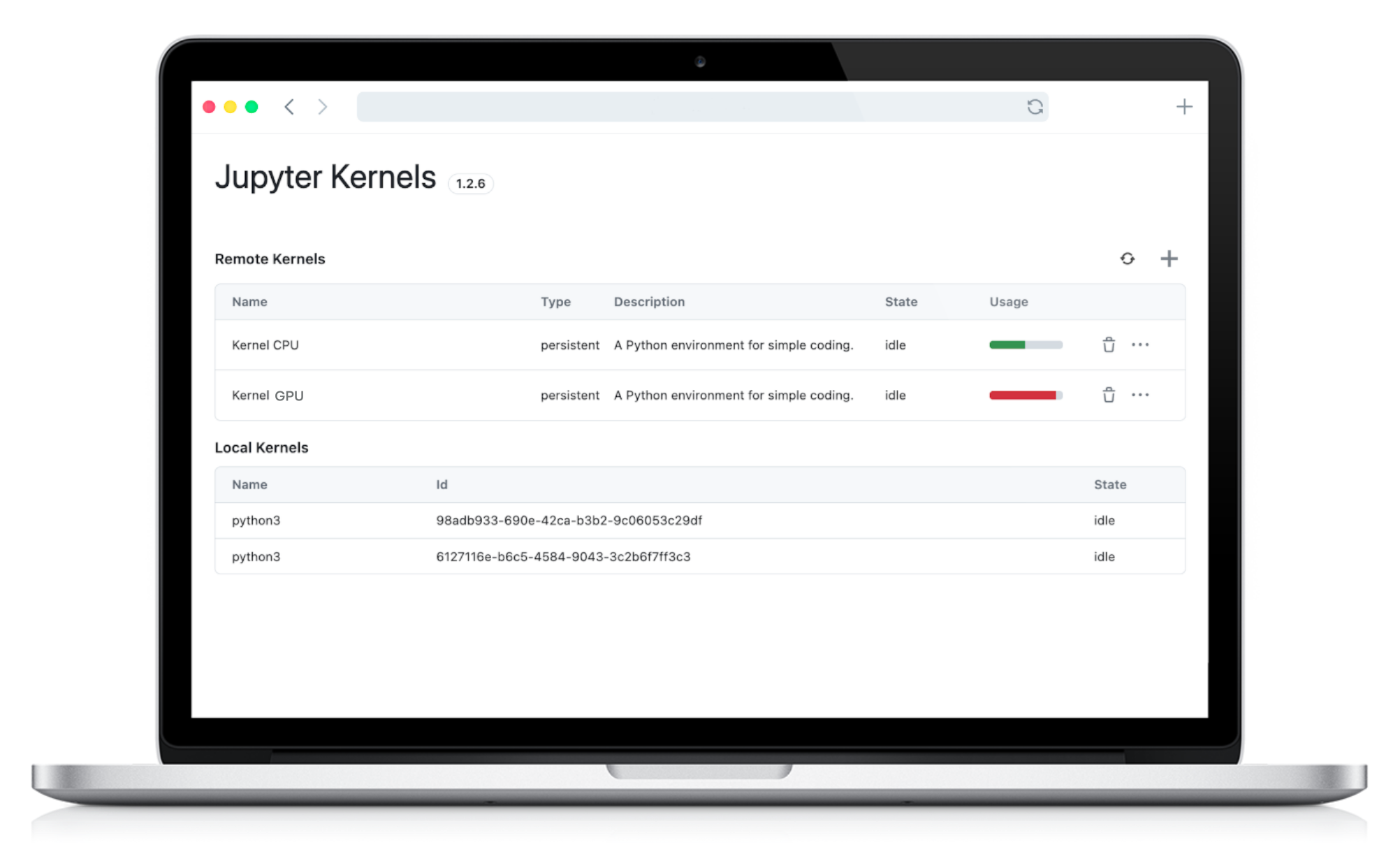
To help you monitor and optimize your resource usage, Datalayer provides a clear and intuitive interface for viewing Remote Kernel usage.

Process and Visualize Results Locally

We switch back to local execution for processing and visualizing the results. This is the processed list of themes and sentiments extracted from the reviews by the Gemma-2 model:

[
{
'review_id': '1',
'themes': {'performance': 'positive', 'speed': 'positive', 'battery': 'negative'}
},
{
'review_id': '2',
'themes': {'camera': 'positive', 'battery': 'negative'}
},
{
'review_id': '3',
themes': {'display': 'positive', 'battery': 'negative'}
},
{
'review_id': '4',
'themes': {'customer support': 'positive', 'camera': 'neutral', 'battery': 'negative'}
}
]

And below is a visualization of the theme and sentiment distribution across the reviews:

Key Takeaways

Datalayer Cell Kernels allow you to selectively run specific cells on remote GPUs. This hybrid approach optimizes both performance and cost by using remote resources only when necessary. Complex tasks like sentiment analysis with large language models become more accessible and efficient.

Check out the full notebook example and sign up on the Datalayer waiting list today and be among the first to experience the future of hybrid Jupyter workflows!

  Datalayer: AI Agents for Data Analysis Register and get free credits

Remote Kernels Preview

· 4 min read
Eric Charles
Datalayer Founder
info

First things first, what is a Jupyter Kernel?

A Jupyter Kernel is the place where the computation of your Jupyter Notebook is happening. A Kernel is separated from the Notebook, hence can run your code remotely on a different system.

Install Datalayer

Datalayer is a JupyterLab extension. To install it, just run the following command in your terminal.

pip install datalayer

You will need python>=3.9 and pip available on your machine.

info

Remote Kernels is being released in a PREVIEW mode. This means that the account you will create will not stay and can be removed at any time based on Datalayer's new releases.

JupyterLab Launcher

Launch JupyterLab as usual.

jupyter lab

JupyterLab users are used to go the their launcher which present typical tiles to create a Notebook and launch a Kernel.

Datalayer introduces a new element at the top of the JupyterLab launcher.

Account

The first step is to authenticate.

If this is your fist contact with Datalayer, you will need an account. Just fill in a few details and check your mailbox for the confirmation code.

Serverless

Once authenticated, Datalayer takes care of the rest and will create the needed services for you in its own infrastructure.

You don't have to worry on anything, just wait on the green light that should appear on your Home page.

Kernels

Once the services are available, it may take a bit of time to have your kernels up-and-running. For now, we offer you 3 differents Remote Kernels.

The Home page also list your local machine Kernels, and will offer in next releases the ability to create local browser Kernels.

Remote Kernels

Remote Kernels creates for now predefined Remote Kernels from your local JupyterLab.

Notebooks

To ease the onboarding, you can create example of Notebooks clicking on the Example buttons.

This step is of course completely optional and you are welcome to directly use your own Notebooks.

You can use the Kernels from the standard JupyterLab kernel picker.

Click on the top-right picker of the Notebook, and assign a Kernel to Notebook (the Remote Kernels are listed at the top).

Local Files

info

The Local Files access feature is highly experimental.

  • You need a local SSH Server.
  • Once a folder is mounted, you'd better restart your server to unmount it (we are working on a better implementation).
  • Windows is not supported for now.
  • ssh from you local machine on your user account has to work without prompt

To mount your Local Files to the Remote Kernel, a SSH Server must be running on your local machine (on port 22) and you must be able to connect without password prompt from your local terminal.

# Has to connect without password prompt.
ssh localhost
# ...

Kernel Lifecycle

You can delete a Kernel.

We will support the start as pause of the Kernel.

note

Kernel start and pause is not supported in the current release.

Need Help?

Contact us for support, we are here to help.

  Datalayer: AI Agents for Data Analysis Register and get free credits

Our experience with the OVHcloud Startup Program

· 9 min read
Eric Charles
Datalayer Founder

OVHcloud Startup Program

As a startup, we have been using the OVHcloud services those last 10+ years for DNS domain name registration. After all, this is what OVH started with and become famous (BTW this blog is hosted under datalayer.blog which we bought from OVH, as most of the other domain names we are using). During that time, we have seen more and more services being launched at OVHcloud (note the name change where cloud is added), starting with the dedicated bare metal offering.

Because we were looking more to the virtual machine and Kubernetes world, we have been naturally tempted to use the Azure, GCP or AWS offerings at their very early stage. All those leading cloud providers offer credits for startups combined with technical support and go-to-market offering.

At some point, Kubernetes at OVH has been around for some time (see this annoucement back in 2019) and we heard from other companies that those new services were very flexible and potentially cheaper than others. So it became clear to us that we wanted to try them and we naturally applied to their Startup program. Guess what, we received a positive response 2 days after 🎉 The journey was ready to start!

  Datalayer: AI Agents for Data Analysis Register and get free credits

Datalayer 0.0.6, a more React.js Jupyter

· 8 min read
Eric Charles
Datalayer Founder

We are thrilled to announce the 0.0.6 release of Datalayer. This release improves the data analytics user and developer experience with Jupyter React, a javascript library to ensure React.js is a first-class citizen in the Jupyter ecosystem.

Jupyter React is built on top of JupyterLab which aims to be the next default notebook for Python data scientists and is actively developed. However, some users sill prefer the classic notebook and JupyterLab is not yet mainstream... The following points can be the identified as the source of the shadow:

  1. The user interface is intimidating and quite complicated. An initiative to strip-down the user interface has been taken with Retrolab, but the result still looks pretty much like JupyterLab without visible value compared to the classic notebook. Users will even loose some beloved features like their preferred keyboard shortcuts, VIM mode, performance...
  2. The extensions ecosystem is rich but breaking changes in the core of JupyterLab have made the overall ecosystem fragile and subject to failures on installation.
  3. The overall performance (startup time, load large notebook, switch tabs...) is know to be degraded on JupyterLab.
  4. The recently merged realtime collaboration feature is solely not usable with a real multi-user authentication and authorization system.
  5. As developer, the Lumino widget toolkit which backs JupyterLab user interface is hard to use and looks pretty much like a Qt toolkit rather than like a modern javascript e.g. React.js, Vue.js, Svelte...
Jupyter React Widgets Gallery
  Datalayer: AI Agents for Data Analysis Register and get free credits

Towards a cloud native Jupyter

· 5 min read
Eric Charles
Datalayer Founder

All Data Scientists know that story... Install the well-known Jupyter Classic or JupyterLab Notebook on their local PC/laptop, pip install some python libraries like pandas..., download some datasets and finally start analysing with a notebook in isolation. There are a few pain points there:

  1. Setting up the tools is hard and time consuming. You have to install Python, Jupyter and add the libraries you need. Conda environments or Docker containers can help mitigate the pain at some point, but finally these are yet additional tools to setup and manage.
  2. At some point, they want to collaborate with teammates, or want to share some results. The Data Scientist is just on his island and has no easy way to break the silo. The recent Realtime collaboration features have been merged into JupyterLab but it is just the permises and miss fundamental building blocks like identity, authorization...
  3. The analysis is not easily reproducible. The setup you have done on a particular Windows platform is completely different from the setup another collaborator may have done on macOS.

More Cloud-native

There comes the need for an better solution. At Datalayer we think that a more Cloud-native Jupyter can help remove those pain points. In other words, we embrasse the infrastructure provided by cloud providers like GCloud, AWS, Azure... and build on top to provide more power to the Data Scientist.

Cloud native computing is an approach in software development that utilizes cloud computing to "build and run scalable applications in modern, dynamic environments such as public, private, and hybrid clouds.

Wikipedia https://en.wikipedia.org/wiki/Cloud_native_computing

  Datalayer: AI Agents for Data Analysis Register and get free credits

Crossplane by example on GCP

· 5 min read
Eric Charles
Datalayer Founder

Crossplane is an open source Kubernetes add-on that enables platform teams to assemble infrastructure from multiple vendors, and expose higher level self-service APIs for application teams to consume, without having to write any code. It allows you to compose cloud infrastructure and services based on XRD (cross resource definitions) that extends the existing Kubernete CRD (Custom Resource Definition). To achieve this awesome goal, you have to use various repositories that reside in the GitHub crossplane, crossplane-contrib and upbound organisations. As adaptor of that new technology, you can rely the official documentation where a lot of details are gathered.

To ease our understanding and document our experiments, we have created a crossplane-example repository that will take you step-by-step to use Crossplane to deploy your infrastructure on top of Google Cloud and also develop a user interface and Helm chart that access a database created by Crossplane.

users

Crossplane community is welcoming, just like the Crossplane logo is fun!

crossplane

  Datalayer: AI Agents for Data Analysis Register and get free credits

A new start with Jupyter

· 2 min read
Eric Charles
Datalayer Founder

Since our last blog post on January 2018, we have changed a lot the Datalayer architecture. Back in 2018, we had chosen for Apache Zeppelin for its good integration with Big Data frameworks like Apache Spark and competely replaced the existing Angular.js user interface with a home-brewed React.js implementation to integrate with the Kubernetes Control Plane. While rolling out more and more features on top of our former version 0.0.1, we have been intrigued in February 2018 by JupyterLab being announced to be ready for users. Back in time, in July 2016, JupyterLab was positioned as the next generation of the Jupyter Notebook.

  Datalayer: AI Agents for Data Analysis Register and get free credits

Datalayer 0.0.1 on Kubernetes

· 3 min read
Eric Charles
Datalayer Founder

Building a complete scalable Data Science Showcase on Kubernetes is another piece which is more challenging to achieve. The Datalayer Science Showcase is designed to be Simple, Collaborative and Multi Cloud and is particulary suited for Data Science exploration teams.

  Datalayer: AI Agents for Data Analysis Register and get free credits

Datalayer Notebook for Big Data Scientists on Azure

· 3 min read
Eric Charles
Datalayer Founder

Datalayer today announced the integration of the Datalayer WEB Notebook for big data scientists with Microsoft OneNote. We also announced that Datalayer WEB Notebook will be deployed on Microsoft Azure. This integration is available for Windows Live, as Office 365 users via the Datalayer WEB Notebook. This authentication can be used today by the Data Scientists to publish their data analysis in the Microsoft OneNote online service, more easily read and accessible to the Business stakeholders.

Working with Microsoft

"Datalayer's offering is bridging the gap between science and business, and fosters business communication. Utilizing Microsoft Azure, Datalayer is offering their customers the opportunity to better communicate and work with their data-driven strategy", said Nicole Herskowitz, Senior Director of Product Marketing, Microsoft Azure, Microsoft Corp.

  Datalayer: AI Agents for Data Analysis Register and get free credits